Features

Every tool.
One program.

From the first line to the printed sheet: everything TANGENTA can do, at a glance.

Draw

  • Rectangle, ellipse, pie and arc
  • Polygon, star and complex star
  • Spiral and graph paper
  • Freehand, 2-point line, Bézier, pen and B-spline
  • 3-point rectangle, ellipse and curve
  • Artistic media and calligraphy
  • Perfect shapes: basic, arrow, flowchart, banner and star shapes
  • Tables with merged cells
  • Dimensions and angular dimensions
  • Connectors that follow their objects

Shape

  • Shape tool with every node type
  • Knife, eraser and crop
  • Weld, intersect, trim
  • Front minus back, back minus front
  • Combine and break apart
  • Convert outline to object
  • Join curves
  • Shaping docker with preview

Fill and outline

  • Uniform fill with colour picker
  • Linear, radial and conical gradients
  • Pattern and texture fills
  • Mesh fill
  • Interactive fill right on the object
  • Outline pen with line styles and arrowheads
  • Eyedropper and copy attributes

Effects

  • Blend along a path
  • Contour inside and outside
  • Extrude
  • Envelope with presets
  • Perspective
  • Drop shadow and transparency
  • Lens with fish eye and other types
  • Bevel and blur
  • SuperClip: place content inside a frame

Text

  • Artistic and paragraph text
  • Linked text frames with overflow
  • Text on path
  • Bullets and drop caps
  • Tabs and paragraph formatting
  • Hyphenation
  • Spell checking and QuickCorrect
  • Font substitution on PDF import

Images

  • Import up to camera RAW (NEF, CR2, CR3, ARW, DNG …)
  • Tone curve, brightness, contrast, colour balance
  • Hue, saturation and filters
  • Crop and mask
  • SuperTrace: turn bitmaps into vectors
  • Image search across eight libraries

Document

  • Multiple pages with a master page
  • Layers and Object Manager
  • Symbols and clones
  • Guidelines, dynamic guides, grid
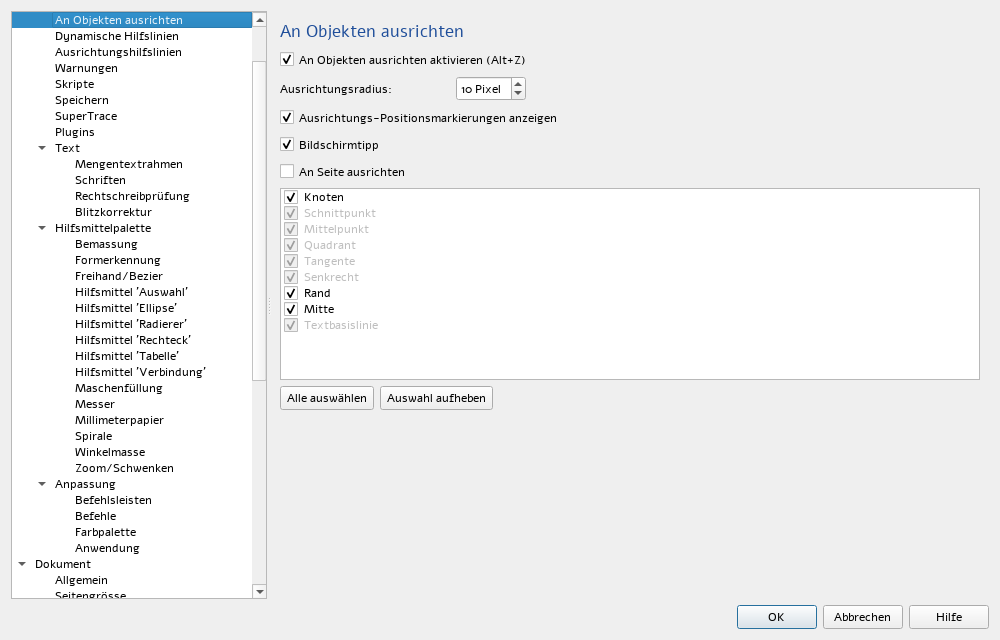
  • Snapping to nodes, centres, edges and the page
  • Unlimited undo
  • Its own open file format (.vek)

Print

  • Print preview
  • Imposition: booklet, signature, n-up, step-and-repeat
  • Crop and fold marks, bleed
  • Labels
  • PDF with presets and preflight

Automate

  • JavaScript scripts with an editor
  • Its own scripting API (tg)
  • AI assistant with 18 tools
  • Image search and web search for the AI

01 / Workspace

Dockers
where you need them.

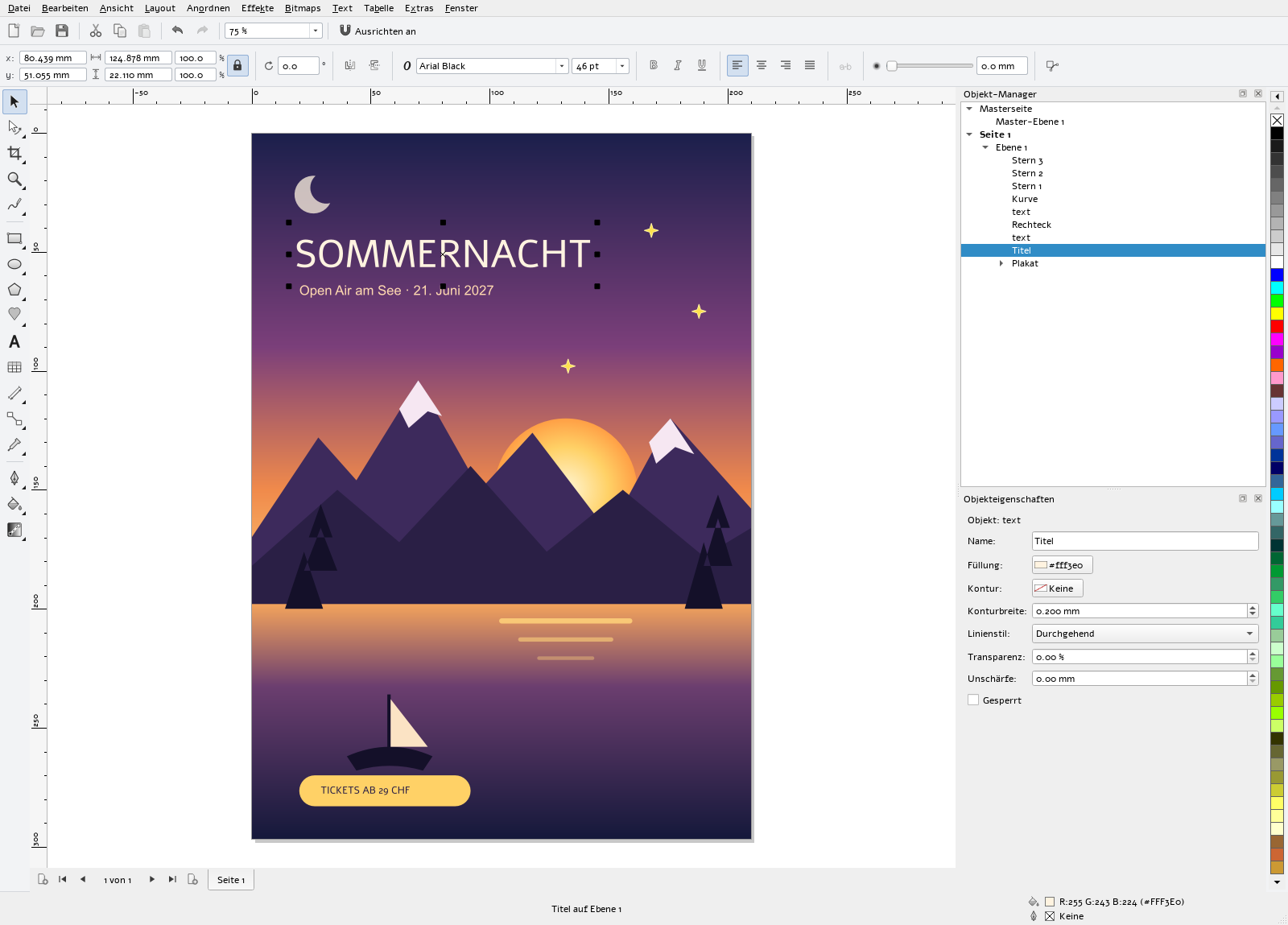
Object Manager, Object Properties, Shaping, Transformations, Symbols, Lens, Envelope, Scripts and AI dock on the right, as tabs or stacked. The property bar at the top always shows the fields for the selected object.

  • Object Manager with pages, layers and master page
  • Property bar for every tool and object type
  • Status bar with the fill and outline of the selection
  • Colour palette on the right edge
TANGENTA with Object Manager and Object Properties, the poster title selected

02 / Settings

Every setting
where you expect it.

The Options dialog (Ctrl+J) arranges Workspace, Document and Global in a tree, the way you are used to: snapping, guidelines, tools, saving, text, spelling, image search, AI and much more.

Options dialog showing the snapping page

03 / File formats

In and out.

Import

SVGPDFEPSPSDXFPNGJPEGTIFFWebPBMPGIFNEFCR2CR3ARWDNG

Export

PDFSVGEPSDXFPNGJPEGTIFFWebPPSDHTML

PDF, SVG and EPS are imported as editable curves and text. For EPS and PS, TANGENTA uses Ghostscript.

04 / Shortcuts

The shortcuts you know.

A selection. Every shortcut is shown next to its command in the menus.

ShortcutCommand
F5Freehand
F6Rectangle
F7Ellipse
F8Text
F10Shape
YPolygon
ASpiral
IArtistic media
XEraser
GInteractive fill
MMesh fill
F11Gradient
F12Outline pen
Ctrl+G / Ctrl+UGroup / ungroup
Ctrl+LCombine
Ctrl+QConvert to curves
Ctrl+DDuplicate
L R T B E C PAlign: left, right, top, bottom, centre, page centre
Ctrl+PgUp / Ctrl+PgDnForward one / back one
Ctrl+I / Ctrl+EImport / export
Alt+EnterObject properties
F9Full-screen preview
Ctrl+JOptions
Ctrl+Alt+KAI assistant

Start drawing.

Free of charge, for Windows and Linux, with AI.